
How to Properly Manage Product SKUs?
Article outline:
- What is a SKU?
- How to create SKUs effectively
- Tools for creating SKUs
- Download our product reference generator
- Best practices and mistakes to avoid
- Best practices for SKU optimization
- SKU applications in the warehouse
Efficient SKU (Stock Keeping Unit) management is crucial for any business that handles inventory. A well-designed SKU strategy can improve operational efficiency, reduce errors, and optimize stock levels. This article explores best practices for creating and managing product SKUs in your warehouse.
What is a SKU?
A SKU (Stock Keeping Unit) is a unique code assigned to each product in an inventory. It is a fundamental element of effective inventory and warehouse management. Unlike universal barcodes (UPCs), SKUs are company-specific and can be customized to meet individual business needs.
SKU composition:
A SKU is generally made up of alphanumeric characters representing various product attributes, such as:
- Product category
- Size
- Color
- Style
- Other relevant attributes
Example:
How to create SKUs effectively
Creating efficient SKUs (Stock Keeping Units) is essential for optimized inventory management. Below are the key steps to follow in order to avoid common mistakes:
- Identify product characteristics: consider attributes such as type, brand, color, size, gender, material, cost, and storage location.
- Define a consistent structure: use a logical format such as
[Category]-[Color]-[Size]-[Serial Number]to standardize your SKUs. - Use clear abbreviations: create a glossary of abbreviations (e.g., T-shirt = TS, Blue = BL, Medium = M).
- Limit length: choose SKUs between 8 and 12 characters for better readability and fewer errors.
- Avoid ambiguous characters: exclude easily confused characters such as 0 and O, or 1 and I.
- Remain flexible: your system should easily adapt to the addition of new products.
Tools for creating and managing SKUs
To optimize SKU management, several online tools can help you:
- TradeGecko (QuickBooks Commerce): ideal for inventory management, with SKU creation features, sales tracking, and integrations with other systems.
- Odoo SKU Generator: a comprehensive ERP solution with inventory management and SKU creation, suitable for different types of businesses.
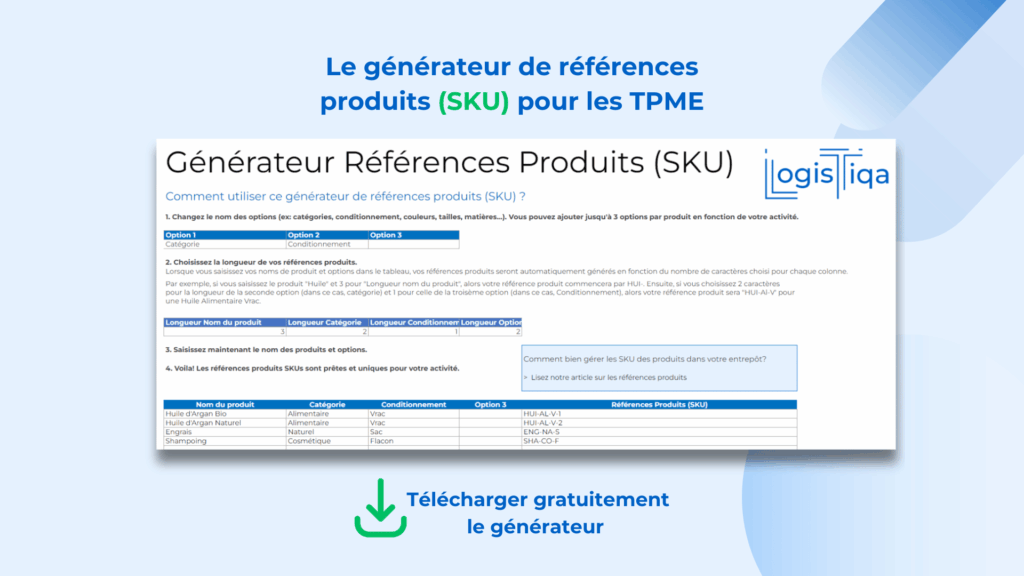
- LogisTiqa: offers an efficient solution to create and manage your SKUs. A free generator greatly simplifies the SKU creation process, provided you have a clear understanding of your priorities based on a list of variants such as type, brand, style, color, size, gender, cost, material, season, and more.
Download our free product reference generator and create your own SKUs.
The process is simple and clearly explained in the file you will download. All you need to do is enter your email address, and you will receive it directly.
Best practices and mistakes to avoid
What to do to create effective SKUs:
✔ Adopt a uniform format: choose a fixed format for all your SKUs to ensure consistency.
✔ Ensure easy readability: letters and numbers should be clear for your teams.
✔ Use a mix of letters and numbers: this improves system flexibility.
What to avoid:
✘ Do not start with zeros or symbols: this can cause confusion.
✘ Do not use duplicate SKUs: each SKU must be unique.
✘ Avoid manufacturer references: they are often too long or not suited to your internal needs.
By following these recommendations, you will optimize product management and reduce inventory tracking errors.
Best practices for SKU optimization
- Regular analysis: review SKU performance frequently to identify fast- and slow-moving products.
- ABC categorization: classify SKUs into A (high value/high rotation), B (medium value/rotation), and C (low value/rotation).
- Dynamic inventory management: adjust stock levels based on historical SKU performance and demand forecasts.
- Continuous training: ensure all staff understand the importance of SKUs and know how to use them properly.
- Technology integration: use advanced analytics tools to get the most value from your SKU data.
- Periodic review: regularly reassess your SKU system to ensure it still meets your current needs.
SKU applications in the warehouse
Proper SKU implementation in warehouse management can significantly improve efficiency and inventory accuracy. Below are some key applications where SKUs prove especially useful:
Inventory control
Each time a new batch of products arrives at the warehouse, a unique SKU is assigned. This makes it easier to track inbound and outbound movements and identify products that require replenishment.
Order management
By using SKUs, employees can quickly locate the exact products requested by customers, reducing confusion and speeding up order preparation.
Space optimization
Knowing exactly which products are in stock, in real time, and how much space they occupy makes it possible to optimize warehouse layout, maximize capacity, and choose the most compact storage solutions to streamline operations.
Demand analysis
SKUs provide detailed sales data for each individual product, helping businesses make informed decisions about which products to keep in stock and which to phase out.
Returns management
Assigning a specific SKU to each product simplifies reverse logistics. The return process becomes smoother and more accurate, as items can be traced from their origin to their final destination.
SKUs are far more than simple product codes. They are the foundation of efficient warehouse management and overall supply chain optimization. By implementing a well-structured SKU system and using it strategically, companies can significantly improve operational efficiency, reduce costs, and enhance customer satisfaction.
The future of SKU management lies in the integration of advanced technologies such as artificial intelligence and the Internet of Things, which promise even greater accuracy and efficiency in inventory and warehouse management.
Posts navigation